CLI, the agent-native cloud. Push a repo or hand it to your agent, and get a live URL, a database and per-second billing.

Push a repo, get a URL.

Point CLI at a GitHub repo, a Docker image, or the folder you're in. It builds it, starts it, and hands back a live HTTPS address.

Databases that back themselves up.

Postgres, MySQL, Redis and MongoDB in one click, wired to your app. Encrypted daily backups for seven days, restorable in place.

A preview for every pull request.

Open a PR and CLI deploys it to its own address with its own database, posts the result on the commit, and cleans up when it closes.

The cloud an agent can pay for.

An agent signs in with its own wallet and pays in USDC on Base or Solana over x402, inside a spending cap you set. People can top up by card.

Scale out, roll back, sleep.

Run replicas behind one address and schedule cron jobs. A deploy takes traffic only once it's healthy, and you hear about it the minute an app goes down.

Pay for the seconds you run.

No plans or seats. CPU and memory are billed by the second for what your services use, and you're warned before credit runs out.

Bring your agent

Works with the agent
you already use.

Hand your agent the skill file or connect it over MCP. It deploys, reads what went wrong, fixes it and tries again, and you watch every step in the dashboard.
  • Deploy from a GitHub repo, a Docker image or a folder
  • Read the error when a build fails, with the fix
  • Add databases, domains, env vars and cron jobs
  • Pay in USDC, inside the cap you set
skill.mdMCPcli commandllms.txt
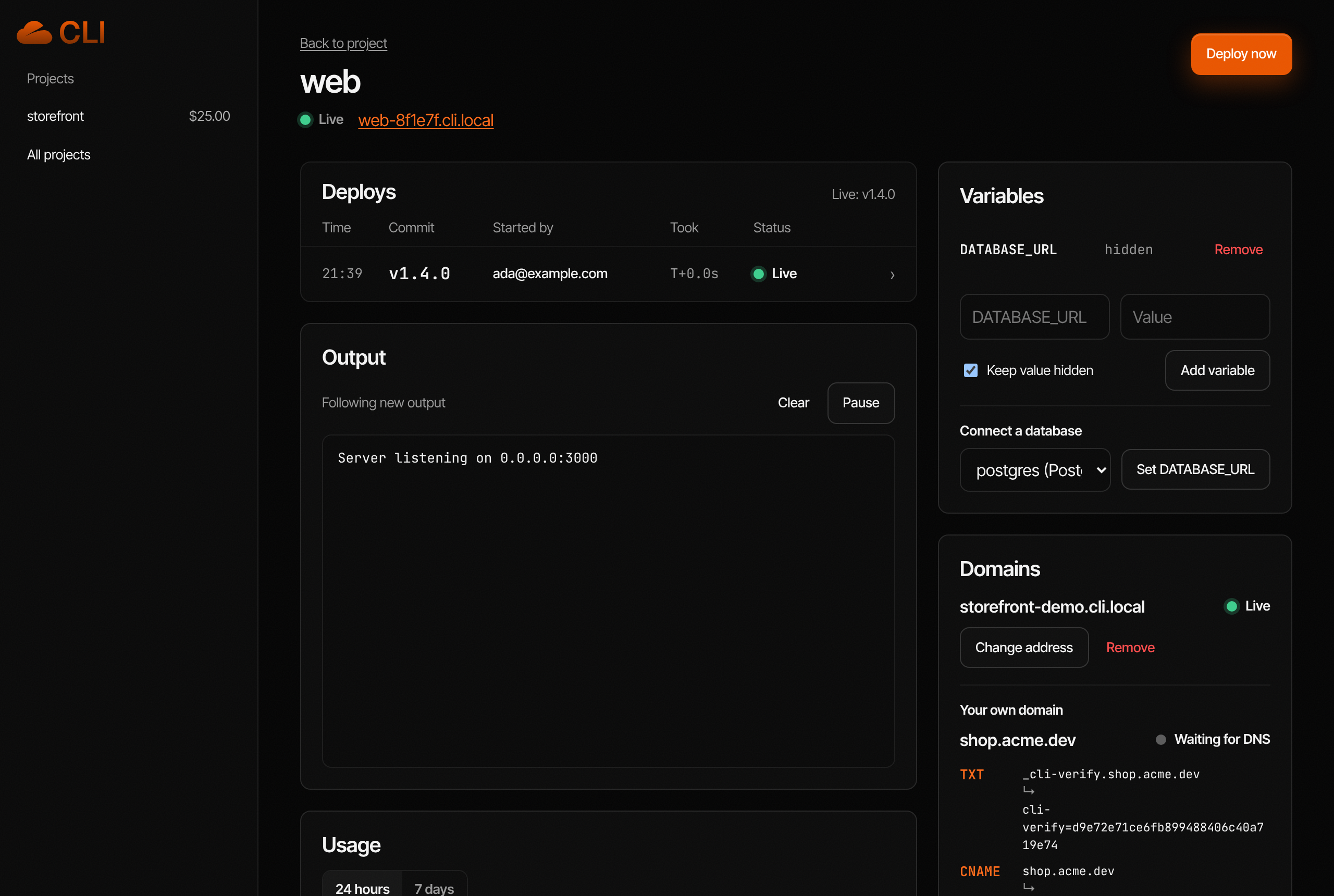
A service in the CLI dashboard: deploys, live logs and usage
No account needed

Your agent can ship before anyone signs up.

Most clouds start with a person, a form and a credit card. On CLI an agent starts with a wallet, and everything after that is an API call it can make on its own.

  1. A wallet is the accountThe agent signs a one-time challenge with a key it already holds. No email, no password, no sign-up form for a human to fill in.
  2. It pays when it needs computeA deploy without credit answers 402 with the price. The agent pays it in USDC over x402 and retries. No card on file, no invoice.
  3. You can join whenever you likeInvite yourself by email to the agent's project and everything is there: deploys, logs, spend. Or keep your own project and give the agent a capped key.
  4. It stays inside the linesSpending caps, monthly budgets, approvals for anything destructive, and an on-call agent that proposes fixes instead of making them.

Agents start from skill.md; every error comes back with its fix (/v1/errors).

agent → api.clicloud.app
POST /v1/auth/challenge { address: 0x7a…e1 }
POST /v1/auth/verify { signature }
200 session for 0x7a…e1

POST /v1/projects { name: "shop" }
POST /v1/services/web/deploys
402 needs $0.05 for the first hour
POST /v1/projects/shop/topup payment-signature: …
200 +$5.00 USDC on Base
POST /v1/services/web/deploys
202 building, about 40s left
live https://web-3f2a.clicloud.app
Pricing

Pay the way
your agent does.

No plans, no seats. Add credit by card, USDC or CLI, and usage comes off your balance by the second.

Card

Top up from $5 with a card.

USDC

On Base and Solana. Connect a wallet and go.

Agent wallets

Agents pay over x402 from their own wallets, inside a spending cap.

CLI token

Pay in CLI on Robinhood Chain for extra credit, or stake it to earn credit.

By the second

Pay for the CPU and memory your services use, up to the size you pick.

Rates
CPU$0.072 per vCPU-hour
Memory$0.037 per GB-hour
Outbound traffic$0.052 per GB
Volumes$0.15 per GB-month
Database backups$0.10 per GB-month, kept 14 days
A free subdomain, previews, logsIncluded

An app on 0.5 vCPU and 512 MB running flat out costs at most $39.74 a month, and most idle far below that. Add credit from $1 in USDC or $5 by card.

The CLI token

Stake CLI, earn compute.

CLI is the token of the agent-native cloud, on Robinhood Chain. Pay for hosting with it and get more credit, or stake it and your project earns credit every hour. It’s optional: cards and USDC work exactly the same.

Pay in CLI

Buy hosting credit with CLI. Priced at a 30-minute average, never a moment’s spike.

Stake for credit

Hosting credit every hour, by how much you stake and how long you lock it. Rewards are credit; no new tokens are minted.

Staking rates

Your rate is a tier (how much you stake) times your lock (none, 30, 90, 180 or 365 days). Live rates show here once CLI is trading on Robinhood Chain.

Credit is worked out hourly on what your stake is worth. Nobody, CLI included, can move staked tokens; you withdraw them when the lock ends.

Questions

Answered.

Not here? The skill file documents every endpoint, error code and price.

Read the skill file

Do I need Kubernetes or any YAML?
No. CLI detects your framework and builds a container, or uses your Dockerfile or a prebuilt image. One command for you, one sentence for your agent.
How does my agent use CLI?
Give it the skill file at /skill.md, or connect the MCP server. It can deploy, read classified errors with fix steps, add databases and env vars, and pay, all inside the role and spending cap you give it.
How do I pay?
Add credit by card, or in USDC on Base or Solana. Agents pay over x402 from their own wallets. Usage comes off the project's balance by the second, and you can set an alert before it runs low.
Can my agents pay for their own compute?
Yes. An agent signs in with its own wallet and pays in USDC. Add it to a project with a spending cap, and every change it makes shows up in the activity log.
Does my agent need an account?
No. Its wallet is its account: it signs a challenge to get a session, and pays for compute in USDC when a deploy asks for it. You can join its project by email later, or keep your own and give it a key with a spending cap.
What is the CLI token?
CLI is the platform's token, on Robinhood Chain. Pay for hosting with it and you get extra credit; stake it and the project you choose earns hosting credit every hour, at a rate set by how much you stake and how long you lock it. Rewards are credit, not new tokens. It's optional: nothing on CLI needs it, and cards and USDC work the same.
What happens if I push a broken commit?
A deploy only takes traffic once its health check passes. If it fails, the previous version keeps serving and you get the error with the steps to fix it. For code problems CLI can open a pull request with the fix, and the on-call agent suggests a rollback or restart when something goes down. One click rolls back to any earlier deploy.
What about my data?
Databases aren't exposed to the internet; your apps reach them over the internal network. Backups are encrypted and kept for seven days, Postgres can be restored to any moment, and branches of a database can have personal data scrubbed before anyone sees them. Deleted services can be restored for a week.

Push. Deploy.
Done.

Push a repo or hand it to your agent. Pay by card or USDC.